Meta’s Ads AI Connector: What Social Media Managers Need to Know
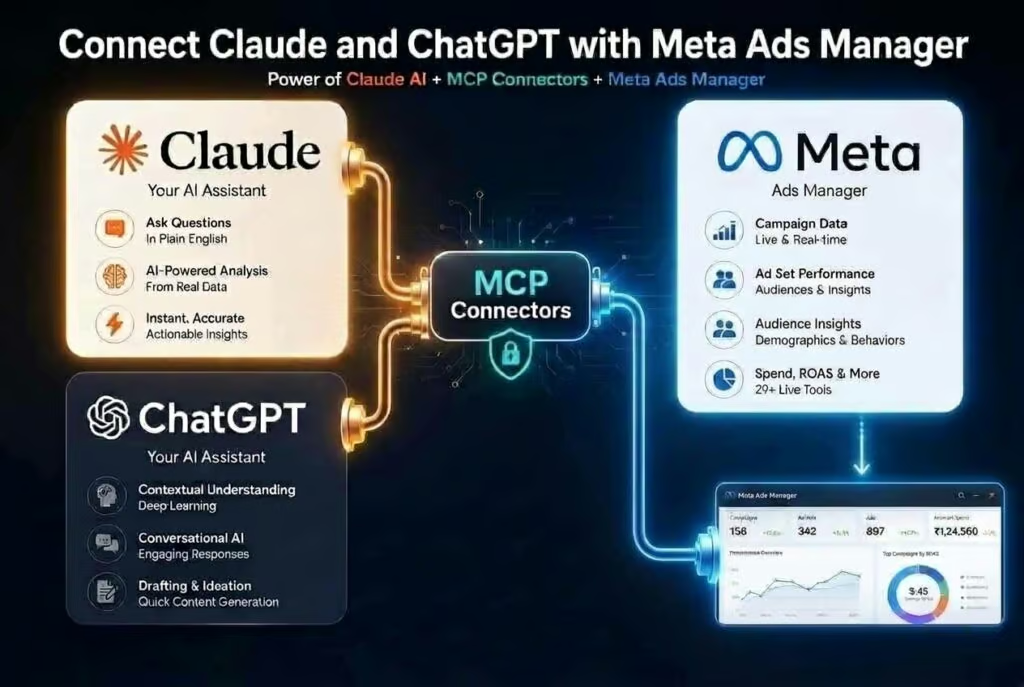
On April 29, 2026, Meta quietly handed every social media manager a new junior employee, one that works for free, never sleeps, and speaks plain English. Meta Ads AI Connectors let you run Facebook and Instagram ad campaigns by talking to ChatGPT, Claude, or any AI tool that supports the Model Context Protocol. No dashboards. No filter menus. Just a conversation.
For agencies and creators juggling five clients and seven platforms, this is not a small update. It is a shift in how paid social actually gets executed day-to-day.
Why It Matters
Paid social has always been the part of social media management that eats the most hours and rewards the least creativity. According to Statista, Meta generated over $160 billion in advertising revenue in 2024, the overwhelming majority of which flows through Ads Manager, an interface built for full-time media buyers, not for someone running posts between TikTok edits and a client call.
If you manage social for multiple brands, you already know the pain. Switching ad accounts. Re-learning which client uses what naming convention. Pulling weekly reports that each look slightly different. The actual creative and strategy work, the part you were hired for, gets squeezed into whatever time is left after the dashboard wrestling.
The AI Connector is Meta’s acknowledgement that the interface itself had become a tax on small operators. By moving the work into a chat window, Meta is betting that more campaigns will get launched, more catalog issues will get fixed, and more budget will actually flow through the platform.
What’s New / How It Works
The connector uses the Model Context Protocol, an open standard originally introduced by Anthropic, to let an AI assistant authenticate against your Meta Business account and operate on your ad data in real time. Once connected, the assistant has read and write access to your campaigns, with one critical guardrail we’ll get to in a moment.
Setup is roughly five minutes. You open ChatGPT or Claude, find the integrations menu, select Meta Ads, and authenticate with the Meta Business account you already use. After that, the AI can do four things that previously each required dashboard work:
- Report on performance, ad results for yesterday, last week, or last month, summarized however you ask for them.
- Build new campaigns from a description, for example, “promote my summer sale with a $30 daily budget to people within 10 miles of my shop.”
- Edit existing ads, change budgets, swap headlines, pause underperformers, restructure ad sets.
- Audit catalog and pixel issues, tell you why products aren’t showing or why tracking is broken.
The guardrail: anything the AI creates lands in your account in a paused state. Nothing spends money until you log into Ads Manager and flip it on yourself. That means the AI cannot torch a client’s budget while you’re asleep, it can only stage work for your approval.
The interface for paid social just shifted from a dashboard to a conversation, and that changes how agencies should staff for it.
The Numbers
Meta hasn’t published throughput benchmarks yet, but the qualitative speedup is significant. Here’s the before-and-after for the tasks social managers spend the most time on:
- Weekly performance report: filter, sort, export, scan → one prompt, answer in seconds
- Diagnosing a cost-per-result spike: click through ~6 reports → ask the AI to diagnose it
- Building a holiday or seasonal campaign: ~45 minutes in Ads Manager → one prompt, review, then activate
- Catalog audit: manual spot-checks → full AI walkthrough of what’s broken
- Setup time for the connector itself: roughly 5 minutes
- Cost: free, in open beta, available to businesses of all sizes
“Get me leads from within 15 miles of my zip code for under $20 each.” That kind of specific, measurable instruction is exactly what the AI Connector is built to optimize toward, far more useful than telling the system to “get more leads.”
What Comes Next
Meta is launching this in open beta, which means three things worth watching. First, the feature set will expand, expect deeper creative generation, audience modeling, and probably native integration with WhatsApp and Threads ad inventory as those properties mature.
Second, every other platform is now on notice. TikTok, Pinterest, LinkedIn, and X all have ad managers that are arguably more painful than Meta’s. If Meta proves that conversational ad management drives more campaign volume, the others will ship MCP-style connectors within twelve months. Social media managers should expect that within a year, “talk to your ads” will be the default workflow across every major platform.
Third, the agency model bends. Junior media buyers spent their first year learning Ads Manager. That learning curve just collapsed. The competitive edge moves from tool fluency to strategy fluency, knowing what to ask the AI, how to brief a campaign, and how to read whether the AI is confidently wrong.
What This Means for You
If you manage social for multiple brands, the immediate move is to fold the AI Connector into your multi-brand workflow, one chat thread per client, with clear naming conventions so you don’t accidentally apply Brand A’s targeting logic to Brand B’s campaign. Use the AI for the routine 90%: pulling weekly reports, drafting campaign skeletons, auditing catalogs. Reserve your human time for the creative direction and the client conversations the AI can’t have.
Pair the connector with your scheduling and publishing workflow so the paid side and the organic side stop living in separate worlds. When you launch a Reels series organically, your AI assistant should be staging the matching boosted post in the same session, not three days later when someone remembers. And lean on your cross-platform analytics to verify what the AI is telling you about Meta against what’s actually happening on TikTok, Pinterest, and LinkedIn, one channel’s story is never the whole picture.
One habit worth burning in: start with questions, not actions. Spend your first session asking for reports and explanations. Get a feel for how the AI reads your account before you let it create anything. And watch your spend daily for the first two weeks, trust, but verify. The connector accelerates execution, but the strategy still has to come from you.
The Bigger Picture
The Meta Ads AI Connector is not a magic button, and anyone selling it as one will burn a client’s budget within a month. What it actually does is collapse the tax that bad interfaces have always charged small operators, the hours lost to filter menus, export buttons, and dashboards built for a different kind of user. For social media managers, that tax was the difference between running ads for four clients and running them well for ten. Lean into the speed, keep the strategy human, and the math on what a one-person social shop can manage just got a lot more interesting.